wxPython 中的俄罗斯方块游戏
最后修改于 2023 年 1 月 10 日
俄罗斯方块是有史以来最受欢迎的电脑游戏之一。这款游戏最初由俄罗斯程序员Alexey Pajitnov于 1985 年设计和编程。从那时起,俄罗斯方块就出现在几乎所有电脑平台上,并有许多变体。
俄罗斯方块被称为下落方块益智游戏。在这个游戏中,我们有七种不同的形状,称为四格骨牌:S 形、Z 形、T 形、L 形、直线形、镜像 L 形和方形。每种形状都由四个正方形组成。这些形状会从屏幕上方掉落。俄罗斯方块游戏的目标是移动和旋转这些形状,使它们尽可能地契合。如果我们设法形成一行,该行就会被消除,我们就会得分。我们玩俄罗斯方块游戏直到游戏结束。
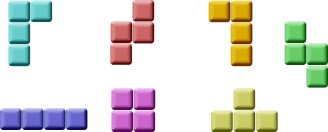
wxPython 是一个用于创建应用程序的工具包。还有其他针对创建电脑游戏的库。尽管如此,wxPython 和其他应用程序工具包也可以用来创建游戏。
开发
我们没有俄罗斯方块游戏的图像,我们使用 wxPython 中可用的绘图 API 来绘制四格骨牌。每一个电脑游戏的背后都有一个数学模型。俄罗斯方块也是如此。
游戏背后的一些想法
- 我们使用
wx.Timer创建一个游戏循环 - 四格骨牌被绘制出来
- 形状以一个正方形一个正方形为基础移动(而不是逐像素)
- 从数学上讲,一个棋盘是一个简单的数字列表
#!/usr/bin/env python

"""
ZetCode wxPython tutorial

This is Tetris game clone in wxPython.

author: Jan Bodnar
website: www.zetcode.com
last modified: July 2020
"""

import wx
import random

class Tetris(wx.Frame):

    def __init__(self, parent):
        wx.Frame.__init__(self, parent, size=(180, 380),
            style=wx.DEFAULT_FRAME_STYLE ^ wx.RESIZE_BORDER ^ wx.MAXIMIZE_BOX)

        self.initFrame()

    def initFrame(self):

        self.statusbar = self.CreateStatusBar()
        self.statusbar.SetStatusText('0')
        self.board = Board(self)
        self.board.SetFocus()
        self.board.start()

        self.SetTitle("Tetris")
        self.Centre()


class Board(wx.Panel):

    BoardWidth = 10
    BoardHeight = 22
    Speed = 300
    ID_TIMER = 1

    def __init__(self, *args, **kw):

        super(Board, self).__init__(*args, **kw)

        self.initBoard()

    def initBoard(self):

        self.timer = wx.Timer(self, Board.ID_TIMER)
        self.isWaitingAfterLine = False
        self.curPiece = Shape()
        self.nextPiece = Shape()
        self.curX = 0
        self.curY = 0
        self.numLinesRemoved = 0
        self.board = []

        self.isStarted = False
        self.isPaused = False

        self.Bind(wx.EVT_PAINT, self.OnPaint)
        self.Bind(wx.EVT_KEY_DOWN, self.OnKeyDown)
        self.Bind(wx.EVT_TIMER, self.OnTimer, id=Board.ID_TIMER)

        self.clearBoard()

    def shapeAt(self, x, y):

        return self.board[(y * Board.BoardWidth) + x]

    def setShapeAt(self, x, y, shape):

        self.board[(y * Board.BoardWidth) + x] = shape

    def squareWidth(self):

        return self.GetClientSize().GetWidth() // Board.BoardWidth

    def squareHeight(self):

        return self.GetClientSize().GetHeight() // Board.BoardHeight

    def start(self):

        if self.isPaused:
            return

        self.isStarted = True
        self.isWaitingAfterLine = False
        self.numLinesRemoved = 0
        self.clearBoard()

        self.newPiece()
        self.timer.Start(Board.Speed)

    def pause(self):

        if not self.isStarted:
            return

        self.isPaused = not self.isPaused
        statusbar = self.GetParent().statusbar

        if self.isPaused:
            self.timer.Stop()
            statusbar.SetStatusText('paused')
        else:
            self.timer.Start(Board.Speed)
            statusbar.SetStatusText(str(self.numLinesRemoved))

        self.Refresh()

    def clearBoard(self):

        for i in range(Board.BoardHeight * Board.BoardWidth):
            self.board.append(Tetrominoes.NoShape)

    def OnPaint(self, event):

        dc = wx.PaintDC(self)

        size = self.GetClientSize()
        boardTop = size.GetHeight() - Board.BoardHeight * self.squareHeight()

        for i in range(Board.BoardHeight):
            for j in range(Board.BoardWidth):

                shape = self.shapeAt(j, Board.BoardHeight - i - 1)

                if shape != Tetrominoes.NoShape:
                    self.drawSquare(dc,
                        0 + j * self.squareWidth(),
                        boardTop + i * self.squareHeight(), shape)

        if self.curPiece.shape() != Tetrominoes.NoShape:

            for i in range(4):

                x = self.curX + self.curPiece.x(i)
                y = self.curY - self.curPiece.y(i)

                self.drawSquare(dc, 0 + x * self.squareWidth(),
                    boardTop + (Board.BoardHeight - y - 1) * self.squareHeight(),
                    self.curPiece.shape())


    def OnKeyDown(self, event):

        if not self.isStarted or self.curPiece.shape() == Tetrominoes.NoShape:
            event.Skip()
            return

        keycode = event.GetKeyCode()

        if keycode == ord('P') or keycode == ord('p'):
            self.pause()
            return

        if self.isPaused:
            return

        elif keycode == wx.WXK_LEFT:
            self.tryMove(self.curPiece, self.curX - 1, self.curY)

        elif keycode == wx.WXK_RIGHT:
            self.tryMove(self.curPiece, self.curX + 1, self.curY)

        elif keycode == wx.WXK_DOWN:
            self.tryMove(self.curPiece.rotatedRight(), self.curX, self.curY)

        elif keycode == wx.WXK_UP:
            self.tryMove(self.curPiece.rotatedLeft(), self.curX, self.curY)

        elif keycode == wx.WXK_SPACE:
            self.dropDown()

        elif keycode == ord('D') or keycode == ord('d'):
            self.oneLineDown()

        else:
            event.Skip()


    def OnTimer(self, event):

        if event.GetId() == Board.ID_TIMER:

            if self.isWaitingAfterLine:
                self.isWaitingAfterLine = False
                self.newPiece()

            else:
                self.oneLineDown()

        else:
            event.Skip()


    def dropDown(self):

        newY = self.curY

        while newY > 0:
            if not self.tryMove(self.curPiece, self.curX, newY - 1):
                break
            newY -= 1

        self.pieceDropped()

    def oneLineDown(self):

        if not self.tryMove(self.curPiece, self.curX, self.curY - 1):
            self.pieceDropped()


    def pieceDropped(self):

        for i in range(4):

            x = self.curX + self.curPiece.x(i)
            y = self.curY - self.curPiece.y(i)
            self.setShapeAt(x, y, self.curPiece.shape())

        self.removeFullLines()

        if not self.isWaitingAfterLine:
            self.newPiece()


    def removeFullLines(self):

        numFullLines = 0

        statusbar = self.GetParent().statusbar

        rowsToRemove = []

        for i in range(Board.BoardHeight):
            n = 0
            for j in range(Board.BoardWidth):
                if not self.shapeAt(j, i) == Tetrominoes.NoShape:
                    n = n + 1

            if n == 10:
                rowsToRemove.append(i)

        rowsToRemove.reverse()

        for m in rowsToRemove:
            for k in range(m, Board.BoardHeight):
                for l in range(Board.BoardWidth):
                        self.setShapeAt(l, k, self.shapeAt(l, k + 1))

            numFullLines = numFullLines + len(rowsToRemove)

            if numFullLines > 0:

                self.numLinesRemoved = self.numLinesRemoved + numFullLines
                statusbar.SetStatusText(str(self.numLinesRemoved))
                self.isWaitingAfterLine = True
                self.curPiece.setShape(Tetrominoes.NoShape)
                self.Refresh()


    def newPiece(self):

        self.curPiece = self.nextPiece
        statusbar = self.GetParent().statusbar
        self.nextPiece.setRandomShape()

        self.curX = Board.BoardWidth // 2 + 1
        self.curY = Board.BoardHeight - 1 + self.curPiece.minY()

        if not self.tryMove(self.curPiece, self.curX, self.curY):

            self.curPiece.setShape(Tetrominoes.NoShape)
            self.timer.Stop()
            self.isStarted = False
            statusbar.SetStatusText('Game over')


    def tryMove(self, newPiece, newX, newY):

        for i in range(4):

            x = newX + newPiece.x(i)
            y = newY - newPiece.y(i)

            if x < 0 or x >= Board.BoardWidth or y < 0 or y >= Board.BoardHeight:
                return False

            if self.shapeAt(x, y) != Tetrominoes.NoShape:
                return False

        self.curPiece = newPiece
        self.curX = newX
        self.curY = newY
        self.Refresh()

        return True


    def drawSquare(self, dc, x, y, shape):

        colors = ['#000000', '#CC6666', '#66CC66', '#6666CC',
                  '#CCCC66', '#CC66CC', '#66CCCC', '#DAAA00']

        light = ['#000000', '#F89FAB', '#79FC79', '#7979FC',
                 '#FCFC79', '#FC79FC', '#79FCFC', '#FCC600']

        dark = ['#000000', '#803C3B', '#3B803B', '#3B3B80',
                 '#80803B', '#803B80', '#3B8080', '#806200']

        pen = wx.Pen(light[shape])
        pen.SetCap(wx.CAP_PROJECTING)
        dc.SetPen(pen)

        dc.DrawLine(x, y + self.squareHeight() - 1, x, y)
        dc.DrawLine(x, y, x + self.squareWidth() - 1, y)

        darkpen = wx.Pen(dark[shape])
        darkpen.SetCap(wx.CAP_PROJECTING)
        dc.SetPen(darkpen)

        dc.DrawLine(x + 1, y + self.squareHeight() - 1,
            x + self.squareWidth() - 1, y + self.squareHeight() - 1)
        dc.DrawLine(x + self.squareWidth() - 1,
        y + self.squareHeight() - 1, x + self.squareWidth() - 1, y + 1)

        dc.SetPen(wx.TRANSPARENT_PEN)
        dc.SetBrush(wx.Brush(colors[shape]))
        dc.DrawRectangle(x + 1, y + 1, self.squareWidth() - 2,
        self.squareHeight() - 2)


class Tetrominoes(object):

    NoShape = 0
    ZShape = 1
    SShape = 2
    LineShape = 3
    TShape = 4
    SquareShape = 5
    LShape = 6
    MirroredLShape = 7


class Shape(object):

    coordsTable = (
        ((0, 0),     (0, 0),     (0, 0),     (0, 0)),
        ((0, -1),    (0, 0),     (-1, 0),    (-1, 1)),
        ((0, -1),    (0, 0),     (1, 0),     (1, 1)),
        ((0, -1),    (0, 0),     (0, 1),     (0, 2)),
        ((-1, 0),    (0, 0),     (1, 0),     (0, 1)),
        ((0, 0),     (1, 0),     (0, 1),     (1, 1)),
        ((-1, -1),   (0, -1),    (0, 0),     (0, 1)),
        ((1, -1),    (0, -1),    (0, 0),     (0, 1))
    )

    def __init__(self):

        self.coords = [[0,0] for i in range(4)]
        self.pieceShape = Tetrominoes.NoShape

        self.setShape(Tetrominoes.NoShape)

    def shape(self):

        return self.pieceShape

    def setShape(self, shape):

        table = Shape.coordsTable[shape]
        for i in range(4):
            for j in range(2):
                self.coords[i][j] = table[i][j]

        self.pieceShape = shape

    def setRandomShape(self):

        self.setShape(random.randint(1, 7))

    def x(self, index):

        return self.coords[index][0]

    def y(self, index):

        return self.coords[index][1]

    def setX(self, index, x):

        self.coords[index][0] = x

    def setY(self, index, y):

        self.coords[index][1] = y

    def minX(self):

        m = self.coords[0][0]
        for i in range(4):
            m = min(m, self.coords[i][0])

        return m

    def maxX(self):

        m = self.coords[0][0]
        for i in range(4):
            m = max(m, self.coords[i][0])

        return m

    def minY(self):

        m = self.coords[0][1]
        for i in range(4):
            m = min(m, self.coords[i][1])

        return m

    def maxY(self):

        m = self.coords[0][1]

        for i in range(4):
            m = max(m, self.coords[i][1])

        return m

    def rotatedLeft(self):

        if self.pieceShape == Tetrominoes.SquareShape:
            return self

        result = Shape()
        result.pieceShape = self.pieceShape

        for i in range(4):
            result.setX(i, self.y(i))
            result.setY(i, -self.x(i))

        return result

    def rotatedRight(self):

        if self.pieceShape == Tetrominoes.SquareShape:
            return self

        result = Shape()
        result.pieceShape = self.pieceShape

        for i in range(4):
            result.setX(i, -self.y(i))
            result.setY(i, self.x(i))

        return result


def main():

    app = wx.App()
    ex = Tetris(None)
    ex.Show()
    app.MainLoop()


if __name__ == '__main__':
    main()
为了更容易理解,游戏被简化了一些。它在应用程序启动后立即开始。我们可以通过按 p 键来暂停游戏。Space 键立即将下落的俄罗斯方块掉落到底部。d 键使方块下降一行。(它可以用来加速下落。)游戏以恒定的速度进行,没有实现加速度。分数是我们已删除的行数。
def __init__(self, *args, **kw):

    super(Board, self).__init__(*args, **kw)
给 Windows 用户的提示。如果无法使用箭头键,请将style=wx.WANTS_CHARS添加到棋盘构造函数。
...
self.curX = 0
self.curY = 0
self.numLinesRemoved = 0
self.board = []
...
在我们开始游戏循环之前,我们会初始化一些重要的变量。self.board变量是一个数字列表,从 0 到 7。它表示各种形状的位置以及棋盘上形状的残余部分。
for i in range(Board.BoardHeight):
    for j in range(Board.BoardWidth):

        shape = self.shapeAt(j, Board.BoardHeight - i - 1)

        if shape != Tetrominoes.NoShape:
            self.drawSquare(dc,
                0 + j * self.squareWidth(),
                boardTop + i * self.squareHeight(), shape)
游戏的绘制分为两个步骤。在第一步中,我们绘制所有形状,或者已经掉落到棋盘底部的形状的残余部分。所有正方形都保存在self.board列表变量中。我们使用shapeAt()方法来访问它。
if self.curPiece.shape() != Tetrominoes.NoShape:

    for i in range(4):

        x = self.curX + self.curPiece.x(i)
        y = self.curY - self.curPiece.y(i)

        self.drawSquare(dc, 0 + x * self.squareWidth(),
            boardTop + (Board.BoardHeight - y - 1) * self.squareHeight(),
            self.curPiece.shape())
下一步是绘制正在下落的实际方块。
elif keycode == wx.WXK_LEFT:
    self.tryMove(self.curPiece, self.curX - 1, self.curY)
在OnKeyDown()方法中,我们检查按下的键。如果我们按下左箭头键,我们尝试将方块向左移动。我们说尝试是因为方块可能无法移动。
def tryMove(self, newPiece, newX, newY):

    for i in range(4):
        x = newX + newPiece.x(i)
        y = newY - newPiece.y(i)
        if x < 0 or x >= Board.BoardWidth or y < 0 or y >= Board.BoardHeight:
            return False
        if self.shapeAt(x, y) != Tetrominoes.NoShape:
            return False

    self.curPiece = newPiece
    self.curX = newX
    self.curY = newY
    self.Refresh()

    return True
在tryMove()方法中,我们尝试移动我们的形状。如果形状在棋盘边缘或与某个其他方块相邻,我们返回False;否则,我们将当前下落的方块放置到一个新的位置,并返回True。
def OnTimer(self, event):

    if event.GetId() == Board.ID_TIMER:
        if self.isWaitingAfterLine:
            self.isWaitingAfterLine = False
            self.newPiece()
        else:
            self.oneLineDown()
    else:
        event.Skip()
在OnTimer()方法中,我们要么创建一个新的方块(在前一个方块掉落到底部之后),要么将下落的方块向下移动一行。
def removeFullLines(self):

    numFullLines = 0

    rowsToRemove = []

    for i in range(Board.BoardHeight):
        n = 0
        for j in range(Board.BoardWidth):
            if not self.shapeAt(j, i) == Tetrominoes.NoShape:
                n = n + 1

        if n == 10:
            rowsToRemove.append(i)

    rowsToRemove.reverse()

    for m in rowsToRemove:
        for k in range(m, Board.BoardHeight):
            for l in range(Board.BoardWidth):
                self.setShapeAt(l, k, self.shapeAt(l, k + 1))
...
如果方块碰到底部,我们调用removeFullLines()方法。首先,我们找出所有完整的行并删除它们。我们通过将当前完整行之上的所有行移动到要删除的一行上来实现它。请注意,我们反转了要删除的行的顺序。否则,它将无法正常工作。在我们的例子中,我们使用朴素重力。这意味着方块可能会漂浮在空隙上方。
def newPiece(self):

    self.curPiece = self.nextPiece
    statusbar = self.GetParent().statusbar
    self.nextPiece.setRandomShape()
    self.curX = Board.BoardWidth / 2 + 1
    self.curY = Board.BoardHeight - 1 + self.curPiece.minY()

    if not self.tryMove(self.curPiece, self.curX, self.curY):

        self.curPiece.setShape(Tetrominoes.NoShape)
        self.timer.Stop()
        self.isStarted = False
        statusbar.SetStatusText('Game over')
newPiece()方法随机创建一个新的俄罗斯方块。如果方块无法进入其初始位置,则游戏结束。
Shape类保存有关俄罗斯方块的信息。
self.coords = [[0,0] for i in range(4)]
在创建时,我们创建一个空的坐标列表。该列表将保存俄罗斯方块的坐标。例如,元组 (0, -1), (0, 0), (-1, 0), (-1, -1) 代表一个旋转的 S 形。下图说明了该形状。
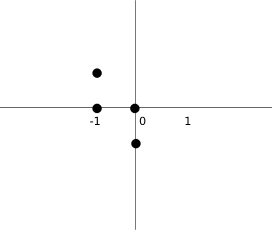
当我们绘制当前下落的方块时,我们将其绘制在self.curX和self.curY位置。然后我们查看坐标表并绘制所有四个正方形。
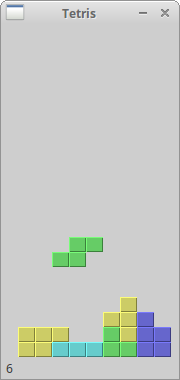
这是一个用 wxPython 编写的俄罗斯方块游戏。