Java Swing 拼图游戏
最后修改于 2023 年 1 月 10 日
在本章中,我们将用 Java Swing 创建一个简单的拼图游戏。 源代码可在作者的 Github 存储库中找到。
这个小游戏的目标是拼出一幅图画。 通过点击包含图像的按钮来移动它们。 只有与空按钮相邻的按钮才能移动。
在这个游戏中,除了其他东西,我们还将学习如何将图像裁剪成多个部分。
package com.zetcode;

import javax.imageio.ImageIO;
import javax.swing.AbstractAction;
import javax.swing.BorderFactory;
import javax.swing.ImageIcon;
import javax.swing.JButton;
import javax.swing.JComponent;
import javax.swing.JFrame;
import javax.swing.JOptionPane;
import javax.swing.JPanel;
import java.awt.BorderLayout;
import java.awt.Color;
import java.awt.EventQueue;
import java.awt.GridLayout;
import java.awt.Image;
import java.awt.Point;
import java.awt.event.ActionEvent;
import java.awt.event.MouseAdapter;
import java.awt.event.MouseEvent;
import java.awt.image.BufferedImage;
import java.awt.image.CropImageFilter;
import java.awt.image.FilteredImageSource;
import java.io.File;
import java.io.IOException;
import java.util.ArrayList;
import java.util.Collections;
import java.util.List;

class MyButton extends JButton {

    private boolean isLastButton;

    public MyButton() {

        super();

        initUI();
    }

    public MyButton(Image image) {

        super(new ImageIcon(image));

        initUI();
    }

    private void initUI() {

        isLastButton = false;
        BorderFactory.createLineBorder(Color.gray);

        addMouseListener(new MouseAdapter() {

            @Override
            public void mouseEntered(MouseEvent e) {
                setBorder(BorderFactory.createLineBorder(Color.yellow));
            }

            @Override
            public void mouseExited(MouseEvent e) {
                setBorder(BorderFactory.createLineBorder(Color.gray));
            }
        });
    }

    public void setLastButton() {

        isLastButton = true;
    }

    public boolean isLastButton() {

        return isLastButton;
    }
}

public class PuzzleEx extends JFrame {

    private JPanel panel;
    private BufferedImage source;
    private BufferedImage resized;
    private Image image;
    private MyButton lastButton;
    private int width, height;

    private List<MyButton> buttons;
    private List<Point> solution;

    private final int NUMBER_OF_BUTTONS = 12;
    private final int DESIRED_WIDTH = 300;


    public PuzzleEx() {

        initUI();
    }

    private void initUI() {

        solution = new ArrayList<>();

        solution.add(new Point(0, 0));
        solution.add(new Point(0, 1));
        solution.add(new Point(0, 2));
        solution.add(new Point(1, 0));
        solution.add(new Point(1, 1));
        solution.add(new Point(1, 2));
        solution.add(new Point(2, 0));
        solution.add(new Point(2, 1));
        solution.add(new Point(2, 2));
        solution.add(new Point(3, 0));
        solution.add(new Point(3, 1));
        solution.add(new Point(3, 2));

        buttons = new ArrayList<>();

        panel = new JPanel();
        panel.setBorder(BorderFactory.createLineBorder(Color.gray));
        panel.setLayout(new GridLayout(4, 3, 0, 0));

        try {
            source = loadImage();
            int h = getNewHeight(source.getWidth(), source.getHeight());
            resized = resizeImage(source, DESIRED_WIDTH, h,
                    BufferedImage.TYPE_INT_ARGB);

        } catch (IOException ex) {
            JOptionPane.showMessageDialog(this, "Could not load image", "Error",
                    JOptionPane.ERROR_MESSAGE);
        }

        width = resized.getWidth(null);
        height = resized.getHeight(null);

        add(panel, BorderLayout.CENTER);

        for (int i = 0; i < 4; i++) {

            for (int j = 0; j < 3; j++) {

                image = createImage(new FilteredImageSource(resized.getSource(),
                        new CropImageFilter(j * width / 3, i * height / 4,
                                (width / 3), height / 4)));

                var button = new MyButton(image);
                button.putClientProperty("position", new Point(i, j));

                if (i == 3 && j == 2) {

                    lastButton = new MyButton();
                    lastButton.setBorderPainted(false);
                    lastButton.setContentAreaFilled(false);
                    lastButton.setLastButton();
                    lastButton.putClientProperty("position", new Point(i, j));
                } else {

                    buttons.add(button);
                }
            }
        }

        Collections.shuffle(buttons);
        buttons.add(lastButton);

        for (int i = 0; i < NUMBER_OF_BUTTONS; i++) {

            var btn = buttons.get(i);
            panel.add(btn);
            btn.setBorder(BorderFactory.createLineBorder(Color.gray));
            btn.addActionListener(new ClickAction());
        }

        pack();

        setTitle("Puzzle");
        setResizable(false);
        setDefaultCloseOperation(JFrame.EXIT_ON_CLOSE);
        setLocationRelativeTo(null);
    }

    private int getNewHeight(int w, int h) {

        double ratio = DESIRED_WIDTH / (double) w;
        int newHeight = (int) (h * ratio);
        return newHeight;
    }

    private BufferedImage loadImage() throws IOException {

        var bimg = ImageIO.read(new File("src/resources/icesid.jpg"));

        return bimg;
    }

    private BufferedImage resizeImage(BufferedImage originalImage, int width,
                                      int height, int type) {

        var resizedImage = new BufferedImage(width, height, type);
        var g = resizedImage.createGraphics();
        g.drawImage(originalImage, 0, 0, width, height, null);
        g.dispose();

        return resizedImage;
    }

    private class ClickAction extends AbstractAction {

        @Override
        public void actionPerformed(ActionEvent e) {

            checkButton(e);
            checkSolution();
        }

        private void checkButton(ActionEvent e) {

            int lidx = 0;

            for (MyButton button : buttons) {
                if (button.isLastButton()) {
                    lidx = buttons.indexOf(button);
                }
            }

            var button = (JButton) e.getSource();
            int bidx = buttons.indexOf(button);

            if ((bidx - 1 == lidx) || (bidx + 1 == lidx)
                    || (bidx - 3 == lidx) || (bidx + 3 == lidx)) {
                Collections.swap(buttons, bidx, lidx);
                updateButtons();
            }
        }

        private void updateButtons() {

            panel.removeAll();

            for (JComponent btn : buttons) {

                panel.add(btn);
            }

            panel.validate();
        }
    }

    private void checkSolution() {

        var current = new ArrayList<Point>();

        for (JComponent btn : buttons) {
            current.add((Point) btn.getClientProperty("position"));
        }

        if (compareList(solution, current)) {
            JOptionPane.showMessageDialog(panel, "Finished",
                    "Congratulation", JOptionPane.INFORMATION_MESSAGE);
        }
    }

    public static boolean compareList(List ls1, List ls2) {

        return ls1.toString().contentEquals(ls2.toString());
    }

    public static void main(String[] args) {

        EventQueue.invokeLater(() -> {

            var puzzle = new PuzzleEx();
            puzzle.setVisible(true);
        });
    }
}
我们使用来自冰河世纪电影的 Sid 角色图像。 我们缩放图像并将其切割成 12 个部分。 这些部分由 JButton 组件使用。 最后一个部分未使用; 我们有一个空按钮。 您可以下载一张相当大的图片并在游戏中用到它。
addMouseListener(new MouseAdapter() {

    @Override
    public void mouseEntered(MouseEvent e) {
        setBorder(BorderFactory.createLineBorder(Color.yellow));
    }

    @Override
    public void mouseExited(MouseEvent e) {
        setBorder(BorderFactory.createLineBorder(Color.gray));

    }
});
当我们将鼠标指针悬停在按钮上时,它的边框会变为黄色。
public boolean isLastButton() {

    return isLastButton;
}
有一个按钮,我们称之为最后一个按钮。 这是一个没有图像的按钮。 其他按钮与此按钮交换空间。
private final int DESIRED_WIDTH = 300;
我们用来形成的图像被缩放以具有所需的宽度。 使用 getNewHeight() 方法,我们计算新的高度,保持图像的比例。
solution.add(new Point(0, 0));
solution.add(new Point(0, 1));
solution.add(new Point(0, 2));
solution.add(new Point(1, 0));
...
解决方案数组列表存储了形成图像的按钮的正确顺序。 每个按钮都由一个 Point 标识。
panel.setLayout(new GridLayout(4, 3, 0, 0));
我们使用 GridLayout 来存储我们的组件。 布局由 4 行和 3 列组成。
image = createImage(new FilteredImageSource(resized.getSource(),
        new CropImageFilter(j * width / 3, i * height / 4,
                (width / 3), height / 4)));
CropImageFilter 用于从已调整大小的图像源中剪切矩形。 它与 FilteredImageSource 对象结合使用,以生成现有图像的裁剪版本。
button.putClientProperty("position", new Point(i, j));
按钮通过它们的 position 客户端属性来标识。 这是一个包含按钮在图片中的正确行和列位置的点。 这些属性用于找出我们是否在窗口中拥有正确的按钮顺序。
if (i == 3 && j == 2) {

    lastButton = new MyButton();
    lastButton.setBorderPainted(false);
    lastButton.setContentAreaFilled(false);
    lastButton.setLastButton();
    lastButton.putClientProperty("position", new Point(i, j));
} else {

    buttons.add(button);
}
没有图像的按钮称为最后一个按钮; 它被放置在网格的底部右角。 它是与被点击的相邻按钮交换位置的按钮。 我们使用 setLastButton() 方法设置它的 isLastButton 标志。
Collections.shuffle(buttons);
buttons.add(lastButton);
我们随机重新排序 buttons 列表的元素。 最后一个按钮,即没有图像的按钮,被插入到列表的末尾。 它不应该被洗牌,当我们开始拼图游戏时,它总是放在最后。
for (int i = 0; i < NUMBER_OF_BUTTONS; i++) {

    var btn = buttons.get(i);
    panel.add(btn);
    btn.setBorder(BorderFactory.createLineBorder(Color.gray));
    btn.addActionListener(new ClickAction());
}
来自 buttons 列表的所有组件都放置在面板上。 我们在按钮周围创建一些灰色边框并添加一个点击动作监听器。
private int getNewHeight(int w, int h) {

    double ratio = DESIRED_WIDTH / (double) w;
    int newHeight = (int) (h * ratio);
    return newHeight;
}
getNewHeight() 方法根据所需的宽度计算图像的高度。 保持图像的比例。 我们使用这些值来缩放图像。
private BufferedImage loadImage() throws IOException {

    var bimg = ImageIO.read(new File("src/resources/icesid.jpg"));

    return bimg;
}
从磁盘加载 JPG 图像。 ImageIO 的 read() 方法返回一个 BufferedImage,这是 Swing 用于操作图像的重要类。
private BufferedImage resizeImage(BufferedImage originalImage, int width,
        int height, int type) throws IOException {

    var resizedImage = new BufferedImage(width, height, type);
    var g = resizedImage.createGraphics();
    g.drawImage(originalImage, 0, 0, width, height, null);
    g.dispose();

    return resizedImage;
}
原始图像通过使用新尺寸创建新的 BufferedImage 来调整大小。 我们从原始图像绘制到这个新的缓冲图像中。
private void checkButton(ActionEvent e) {

    int lidx = 0;

    for (MyButton button : buttons) {
        if (button.isLastButton()) {
            lidx = buttons.indexOf(button);
        }
    }

    var button = (JButton) e.getSource();
    int bidx = buttons.indexOf(button);

    if ((bidx - 1 == lidx) || (bidx + 1 == lidx)
            || (bidx - 3 == lidx) || (bidx + 3 == lidx)) {
        Collections.swap(buttons, bidx, lidx);
        updateButtons();
    }
}
按钮存储在数组列表中。 然后将此列表映射到面板的网格。 我们获得最后一个按钮和被点击按钮的索引。 如果它们相邻,则使用 Collections.swap() 交换它们。
private void updateButtons() {

    panel.removeAll();

    for (JComponent btn : buttons) {

        panel.add(btn);
    }

    panel.validate();
}
updateButtons() 方法将列表映射到面板的网格。 首先,使用 removeAll() 方法删除所有组件。 使用 for 循环遍历 buttons 列表,将重新排序的按钮添加回面板的布局管理器。 最后,validate() 方法实现新的布局。
private void checkSolution() {

    var current = new ArrayList<Point>();

    for (JComponent btn : buttons) {
        current.add((Point) btn.getClientProperty("position"));
    }

    if (compareList(solution, current)) {
        JOptionPane.showMessageDialog(panel, "Finished",
                "Congratulation", JOptionPane.INFORMATION_MESSAGE);
    }
}
解决方案检查通过将正确排序的按钮的点列表与包含窗口中按钮顺序的当前列表进行比较来完成。 如果达到解决方案,则会显示消息对话框。
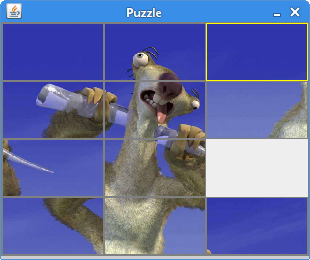
这是拼图游戏。