Node Sass 教程
最后修改于 2023 年 10 月 18 日
在本文中,我们将展示如何使用 node-sass 模块。 node-sass 模块用于将 Sass 代码转换为 CSS 代码。
Sass
Sass 是一种预处理器脚本语言,它被解释或编译成层叠样式表 (CSS)。 Sass 包含两种语法。 较旧的语法使用缩进分隔代码块,使用换行符分隔规则。 较新的语法 SCSS 使用类似 CSS 的块格式。 它使用大括号表示代码块,并使用分号分隔块内的行。
缩进语法和 SCSS 文件通常分别使用扩展名 .sass 和 .scss。
Node-sass
Node-sass 是一个库,它为 Node.js 提供了对 LibSass 的绑定,LibSass 是流行的样式表预处理器 Sass 的 C 语言版本。 它允许我们以原生方式将 SCSS 文件编译为 CSS。
Node Sass 示例
在下面的示例中,我们创建一个使用 node-sass 模块的简单 Web 项目。
$ mkdir sass
$ mkdir -p public/css
在项目目录中,我们创建三个子目录。 在 sass 目录中,我们有 SCSS 代码。 SCSS 代码被翻译成 CSS 并移动到 public/css 目录中。
$ npm init -y
我们启动一个新的 Node 应用程序。
$ npm i node-sass
我们安装 node-sass 模块。 我们使用该模块来监视 SCSS 文件并自动将它们转换为 CSS 代码。
$ npm install -g live-server
此外,我们安装 live-server,它是一个具有实时重载功能的小型开发服务器。
{
  "name": "nodesass-ex",
  "version": "1.0.0",
  "description": "",
  "main": "index.js",
  "scripts": {
    "sass": "node-sass -w sass -o public/css"
  },
  "keywords": [],
  "author": "Jan Bodnar",
  "license": "BSD",
  "dependencies": {
    "node-sass": "^5.0.0"
  }
}
在 package.json 文件中,我们创建一个运行 node-sass 模块的脚本。 它将监视 sass 目录并将编译后的代码输出到 public/css 目录中。
<!DOCTYPE html>
<html lang="en">
<head>
    <meta charset="UTF-8">
    <meta name="viewport" content="width=device-width, initial-scale=1.0">
    <link rel="stylesheet" href="css/main.css">
    <title>Home page</title>
</head>
<body>

<div class="container">

    <h1>Bugs</h1>

    <table>

        <tr>
            <th>Bug name</th>
            <th>Description</th>
        </tr>

        <tr>
            <td>Assasin bug</td>
            <td>The assassin bug uses its short three-segmented beak to pierce
                its prey and eat it.</td>
        </tr>

        <tr>
            <td>Bed bug</td>
            <td>Bed bugs are parasitic insects in the that feed exclusively
                on blood.</td>
        </tr>

        <tr>
            <td>Carpet beetle</td>
            <td>Considered a pest of domestic houses and, particularly, natural
                history museums where the larvae may damage natural fibers and
                can damage carpets, furniture, clothing, and insect collections.</td>
        </tr>

        <tr>
            <td>Earwig</td>
            <td>Earwigs are mostly nocturnal and often hide in small, moist
                crevices during the day, and are active at night, feeding on
                a wide variety of insects and plants.</td>
        </tr>

    </table>

</div>


</body>
</html>
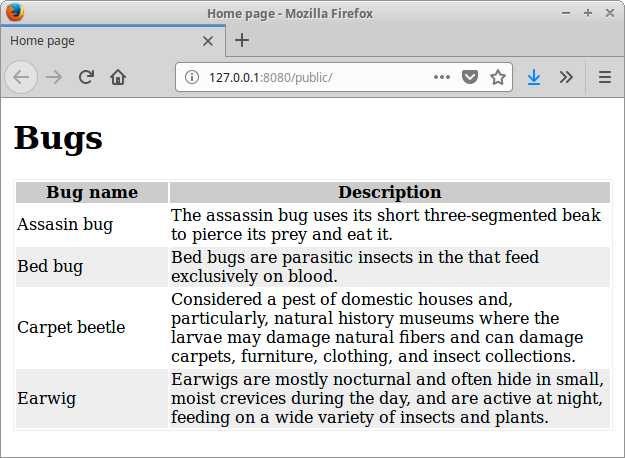
这是一个包含一些数据的 HTML 文件。 此文档使用 CSS 文件进行样式设置。
<link rel="stylesheet" href="css/main.css">
CSS 代码从 css/main 目录加载。
$myfont: Georgia 1.1em;
$table_head_col: #ccc;
$table_row_col: #eee;
$table_bor_col: #eee;
$container_width: 700px;
$first_col_width: 150px;

div.container {

    margin: auto;
    font: $myfont;
    width: $container_width;
}

table {

    tr:nth-child(odd) {background: $table_row_col}

    td:first-child {width: $first_col_width}

    th {
        background-color: $table_head_col;
    }

    border: 1px solid $table_bor_col;
}
这是我们的 SCSS 代码。 我们设置容器和表格的样式。 该代码使用两个重要的 SCSS 功能:变量和嵌套。
以下命令在单独的终端中运行; 它们启动两个正在运行的进程。
$ npm run sass
我们运行 sass 脚本。
$ live-server --open=public
最后,我们启动开发服务器。 现在修改 sass/main.scss 文件。
来源
在本文中,我们使用了 node-sass 模块。 我们在一个简单的 Web 应用程序中使用该模块来将其 SCSS 代码编译成 CSS 代码。