JavaFX 效果
最后修改于 2023 年 10 月 18 日
JavaFX 包含 javafx.scene.effect 包,它包含一组执行各种视觉效果的类。 在本章中,我们创建一个 DropShadow,一个 Reflection,一个 Lighting,一个 GaussianBlur,一个 SepiaTone 和一个 PerspectiveTransform 效果。 我们还展示了如何组合多个效果。
效果通过节点的 effectProperty 使用 setEffect 方法应用。
JavaFX 阴影
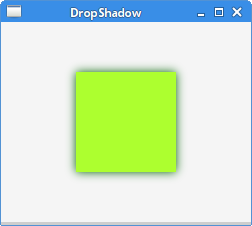
DropShadow 是一种高级效果,它使用指定的颜色、半径和偏移量在内容后面呈现阴影。
package com.zetcode;

import javafx.application.Application;
import javafx.scene.Scene;
import javafx.scene.effect.DropShadow;
import javafx.scene.layout.StackPane;
import javafx.scene.paint.Color;
import javafx.scene.shape.Rectangle;
import javafx.stage.Stage;

public class DropShadowEx extends Application {

    @Override
    public void start(Stage stage) {

        initUI(stage);
    }

    private void initUI(Stage stage) {

        var root = new StackPane();

        var rect = new Rectangle(0, 0, 100, 100);
        rect.setFill(Color.GREENYELLOW);

        var ds = new DropShadow(15, Color.DARKGREEN);

        rect.setEffect(ds);

        root.getChildren().add(rect);

        var scene = new Scene(root, 250, 200, Color.WHITESMOKE);

        stage.setTitle("DropShadow");
        stage.setScene(scene);
        stage.show();
    }

    public static void main(String[] args) {
        launch(args);
    }
}
该示例在矩形周围创建一个阴影。
var rect = new Rectangle(0, 0, 100, 100);
rect.setFill(Color.GREENYELLOW);
构建一个黄绿色矩形形状。
var ds = new DropShadow(15, Color.DARKGREEN);
创建一个 DropShadow 效果。构造函数接受半径和颜色。
rect.setEffect(ds);
使用 setEffect 方法应用效果。
JavaFX 反射
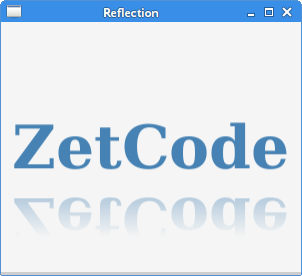
Reflection 是一种效果,它在实际输入内容下方呈现输入内容的反射版本。
package com.zetcode;

import javafx.application.Application;
import javafx.scene.Scene;
import javafx.scene.effect.Reflection;
import javafx.scene.layout.StackPane;
import javafx.scene.paint.Color;
import javafx.scene.text.Font;
import javafx.scene.text.FontWeight;
import javafx.scene.text.Text;
import javafx.stage.Stage;

public class ReflectionEx extends Application {

    @Override
    public void start(Stage stage) {

        initUI(stage);
    }

    private void initUI(Stage stage) {

        var root = new StackPane();

        var text = new Text();
        text.setText("ZetCode");
        text.setFill(Color.STEELBLUE);
        text.setFont(Font.font("Serif", FontWeight.BOLD, 60));

        var ref = new Reflection();
        text.setEffect(ref);

        root.getChildren().add(text);

        var scene = new Scene(root, 300, 250, Color.WHITESMOKE);

        stage.setTitle("Reflection");
        stage.setScene(scene);
        stage.show();
    }

    public static void main(String[] args) {
        launch(args);
    }
}
该示例将 Reflection 效果应用于 Text 节点。
var text = new Text();
text.setText("ZetCode");
text.setFill(Color.STEELBLUE);
text.setFont(Font.font("Serif", FontWeight.BOLD, 60));
创建一个 Text 控件。它的颜色是钢蓝色。字体加粗并放大。
var ref = new Reflection();
text.setEffect(ref);
创建一个默认的 Reflection 并将其应用于文本控件。
JavaFX 照明
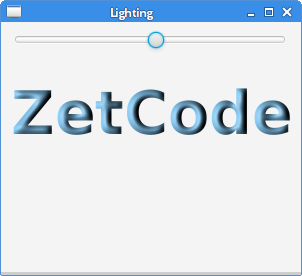
Lighting 模拟一个照射到给定内容上的光源,可用于使平面对象具有更逼真的三维外观。Light 源的 setAzimuth 方法设置方位角 — 光源的方向角。
package com.zetcode;

import javafx.application.Application;
import javafx.beans.property.SimpleDoubleProperty;
import javafx.geometry.Insets;
import javafx.scene.Scene;
import javafx.scene.control.Slider;
import javafx.scene.effect.Light;
import javafx.scene.effect.Lighting;
import javafx.scene.layout.VBox;
import javafx.scene.paint.Color;
import javafx.scene.text.Font;
import javafx.scene.text.FontWeight;
import javafx.scene.text.Text;
import javafx.stage.Stage;

public class LightingEx extends Application {

    @Override
    public void start(Stage stage) {

        initUI(stage);
    }

    private void initUI(Stage stage) {

        var root = new VBox(30);
        root.setPadding(new Insets(10));

        var azimuth = new SimpleDoubleProperty(0);

        Light.Distant light = new Light.Distant();
        light.setAzimuth(0);

        var lighting = new Lighting(light);
        lighting.setSurfaceScale(5.0);

        var text = new Text();
        text.setText("ZetCode");
        text.setFill(Color.LIGHTSKYBLUE);
        text.setFont(Font.font(null, FontWeight.BOLD, 60));

        var slider = new Slider(1, 360, 0);
        azimuth.bind(slider.valueProperty());

        slider.valueProperty().addListener(event -> {

            light.setAzimuth(azimuth.get());
            lighting.setLight(light);
            text.setEffect(lighting);
        });

        text.setEffect(lighting);

        root.getChildren().addAll(slider, text);

        var scene = new Scene(root, 300, 250, Color.WHITESMOKE);

        stage.setTitle("Lighting");
        stage.setScene(scene);
        stage.show();
    }

    public static void main(String[] args) {
        launch(args);
    }
}
该示例将 Lighting 效果应用于 Text 控件。光的方位角由 Slider 控制。
Light.Distant light = new Light.Distant();
light.setAzimuth(0);
创建一个 Light 源。
var lighting = new Lighting(light);
此行创建一个带有指定光照的 Lighting 新实例。
var text = new Text();
text.setText("ZetCode");
text.setFill(Color.LIGHTSKYBLUE);
text.setFont(Font.font(null, FontWeight.BOLD, 60));
这是设置 Lighting 效果的 Text 控件。
var slider = new Slider(1, 360, 0);
azimuth.bind(slider.valueProperty());

slider.valueProperty().addListener(event -> {
    light.setAzimuth(azimuth.get());
    lighting.setLight(light);
    text.setEffect(lighting);
});
Slider 控件管理光源的方位角。
JavaFX 高斯模糊
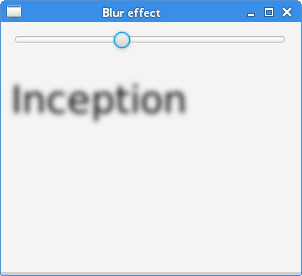
GaussianBlur 是一种使用高斯卷积核的模糊效果,具有可配置的半径。
package com.zetcode;

import javafx.application.Application;
import javafx.beans.property.SimpleDoubleProperty;
import javafx.geometry.Insets;
import javafx.scene.Scene;
import javafx.scene.control.Slider;
import javafx.scene.effect.GaussianBlur;
import javafx.scene.layout.VBox;
import javafx.scene.paint.Color;
import javafx.scene.text.Font;
import javafx.scene.text.Text;
import javafx.stage.Stage;

public class GaussianBlurEx extends Application {

    @Override
    public void start(Stage stage) {

        initUI(stage);
    }

    private void initUI(Stage stage) {

        var root = new VBox(30);
        root.setPadding(new Insets(10));

        var radius = new SimpleDoubleProperty(0);

        var blurredText = new Text("Inception");
        blurredText.setFont(Font.font(38));

        var slider = new Slider(1, 20, 1);
        radius.bind(slider.valueProperty());

        slider.valueProperty().addListener(event -> {
            blurredText.setEffect(new GaussianBlur(radius.get()));
        });

        root.getChildren().addAll(slider, blurredText);

        var scene = new Scene(root, 300, 250, Color.WHITESMOKE);

        stage.setTitle("Blur effect");
        stage.setScene(scene);
        stage.show();
    }

    public static void main(String[] args) {
        launch(args);
    }
}
该示例将 GaussianBlur 效果应用于 Text 控件。模糊的半径由 Slider 控制。
var blurredText = new Text("Inception");
blurredText.setFont(Font.font(38));
模糊效果将应用于此文本控件。
var slider = new Slider(1, 20, 1);
radius.bind(slider.valueProperty());

slider.valueProperty().addListener(event -> {
    blurredText.setEffect(new GaussianBlur(radius.get()));
});
Slider 控件管理 GaussianBlur 效果的 radius 属性。
JavaFX 褐色调
SepiaTone 是一种过滤器,可产生褐色调效果,类似于古董照片。
package com.zetcode;

import javafx.application.Application;
import javafx.beans.binding.Bindings;
import javafx.scene.CacheHint;
import javafx.scene.Scene;
import javafx.scene.effect.Effect;
import javafx.scene.effect.SepiaTone;
import javafx.scene.image.Image;
import javafx.scene.image.ImageView;
import javafx.scene.layout.StackPane;
import javafx.scene.paint.Color;
import javafx.stage.Stage;

public class SepiaToneEx extends Application {

    @Override
    public void start(Stage stage) {

        initUI(stage);
    }

    private void initUI(Stage stage) {

        var root = new StackPane();
        var image = new Image("file:src/main/resources/mushroom.png");
        var iw = new ImageView(image);

        var sepia = new SepiaTone();
        iw.effectProperty().bind(
                Bindings.when(iw.hoverProperty())
                        .then((Effect) sepia)
                        .otherwise((Effect) null)
        );

        iw.setCache(true);
        iw.setCacheHint(CacheHint.SPEED);

        root.getChildren().add(iw);

        var scene = new Scene(root);

        stage.setTitle("SepiaTone");
        scene.setFill(Color.WHITESMOKE);
        stage.setScene(scene);
        stage.show();
    }

    public static void main(String[] args) {
        launch(args);
    }
}
当鼠标指针悬停在图像上时,该示例将 SepiaTone 效果应用于 Image。
var image = new Image("file:src/main/resources/mushroom.png");
var iw = new ImageView(image);
我们从磁盘加载一个 Image 并创建一个 ImageView 控件。
var sepia = new SepiaTone();
iw.effectProperty().bind(
        Bindings.when(iw.hoverProperty())
                .then((Effect) sepia)
                .otherwise((Effect) null)
);
当鼠标指针位于 ImageView 控件的边界上时,设置 SepiaTone 效果。
iw.setCache(true);
iw.setCacheHint(CacheHint.SPEED);
出于性能原因,缓存节点渲染。
JavaFX 透视变换
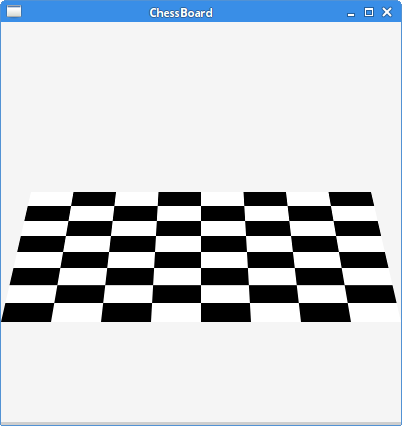
PerspectiveTransform 提供输入内容的非仿射变换。它通常用于在二维内容上创建三维效果。
package com.zetcode;

import javafx.application.Application;
import javafx.scene.Scene;
import javafx.scene.effect.PerspectiveTransform;
import javafx.scene.layout.Pane;
import javafx.scene.layout.StackPane;
import javafx.scene.paint.Color;
import javafx.scene.shape.Rectangle;
import javafx.stage.Stage;

public class PerspectiveEx extends Application {

    private final int SIZE = 50;

    @Override
    public void start(Stage stage) {

        initUI(stage);
    }

    private void initUI(Stage stage) {

        var root = new StackPane();

        var board = new Pane();

        for (int row = 0; row < 8; row++) {
            for (int col = 0; col < 8; col++) {

                var r = new Rectangle(col * SIZE, row*SIZE,
                        SIZE, SIZE);

                if ((col+row) % 2 == 0) {
                    r.setFill(Color.WHITE);
                } else {
                    r.setFill(Color.BLACK);
                }

                board.getChildren().add(r);
            }
        }

        var e = new PerspectiveTransform();
        e.setUlx(30);     // Upper-left point
        e.setUly(170);
        e.setUrx(370);    // Upper-right point
        e.setUry(170);
        e.setLlx(0);      // Lower-left point
        e.setLly(300);
        e.setLrx(400);    // Lower-right point
        e.setLry(300);
        board.setEffect(e);

        root.getChildren().add(board);

        var scene = new Scene(root, Color.WHITESMOKE);

        stage.setTitle("ChessBoard");
        stage.setScene(scene);
        stage.show();
    }

    public static void main(String[] args) {
        launch(args);
    }
}
该示例使用 PerspectiveTransform 效果形成一个棋盘格。
for (int row = 0; row < 8; row++) {
    for (int col = 0; col < 8; col++) {

        var r = new Rectangle(col * SIZE, row*SIZE,
                SIZE, SIZE);

        if ((col+row) % 2 == 0) {
            r.setFill(Color.WHITE);
        } else {
            r.setFill(Color.BLACK);
        }

        board.getChildren().add(r);
    }
}
此代码生成 64 个矩形。矩形具有黑色和白色。
var e = new PerspectiveTransform();
e.setUlx(30);     // Upper-left point
e.setUly(170);
e.setUrx(370);    // Upper-right point
e.setUry(170);
e.setLlx(0);      // Lower-left point
e.setLly(300);
e.setLrx(400);    // Lower-right point
e.setLry(300);
board.setEffect(e);
实例化一个 PerspectiveTransform 并将其应用于节点。我们提供四个角点的 x 和 y 坐标。这些点形成一个矩形,效果渲染到该矩形中。
JavaFX 组合效果
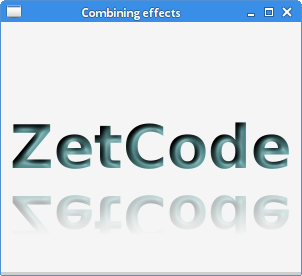
可以组合效果。如果已经设置了一个效果,setEffect 方法会替换它。要组合多个效果,我们使用 Effect 的 setInput 方法。
package com.zetcode;

import javafx.application.Application;
import javafx.scene.Scene;
import javafx.scene.effect.Light;
import javafx.scene.effect.Lighting;
import javafx.scene.effect.Reflection;
import javafx.scene.layout.StackPane;
import javafx.scene.paint.Color;
import javafx.scene.text.Font;
import javafx.scene.text.FontWeight;
import javafx.scene.text.Text;
import javafx.stage.Stage;

public class CombiningEffectsEx extends Application {

    @Override
    public void start(Stage stage) {

        initUI(stage);
    }

    private void initUI(Stage stage) {

        var root = new StackPane();

        Light.Distant light = new Light.Distant();
        light.setAzimuth(50);

        var lighting = new Lighting();
        lighting.setLight(light);
        lighting.setSurfaceScale(5);

        var text = new Text();
        text.setText("ZetCode");
        text.setFill(Color.CADETBLUE);
        text.setFont(Font.font(null, FontWeight.BOLD, 60));

        var ref = new Reflection();
        ref.setInput(lighting);
        text.setEffect(ref);

        root.getChildren().add(text);

        var scene = new Scene(root, 300, 250, Color.WHITESMOKE);

        stage.setTitle("Combining effects");
        stage.setScene(scene);
        stage.show();
    }

    public static void main(String[] args) {
        launch(args);
    }
}
该示例程序将 Reflection 效果与 Lighting 效果组合在 Text 节点上。
Light.Distant light = new Light.Distant();
light.setAzimuth(50);

var lighting = new Lighting();
lighting.setLight(light);
lighting.setSurfaceScale(5.0);
这些行创建了 Lighting 效果。
var text = new Text();
text.setText("ZetCode");
text.setFill(Color.CADETBLUE);
text.setFont(Font.font(null, FontWeight.BOLD, 60));
创建一个 Text 控件。字体被放大并加粗。文本的颜色是军校蓝。
var ref = new Reflection();
ref.setInput(lighting);
构造一个 Reflection 效果。它与使用 setInput 方法的照明效果相结合。
text.setEffect(ref);
最终的效果组合使用 setEffect 方法应用于节点。
在本章中,我们创建了几个视觉效果。