Pango
最后修改于 2023 年 10 月 18 日
在本 GTK# 编程教程中,我们将探索 Pango 库。
Pango 是一个免费且开源的计算库,用于高质量地渲染国际化文本。可以使用不同的字体后端,从而允许跨平台支持。(维基百科)
Pango 提供高级字体和文本处理功能,用于 Gdk 和 Gtk。
简单示例
在我们的第一个例子中,我们将展示如何更改标签组件的字体。
using Gtk;
using System;

class SharpApp : Window {

    private Label label;

    public SharpApp() : base("Pango")
    {
        SetPosition(WindowPosition.Center);
        DeleteEvent += delegate { Application.Quit(); };

        string text = @"Excess of joy is harder to bear than any amount of sorrow.
The more one judges, the less one loves.
There is no such thing as a great talent without great will power. ";

        label = new Label(text);

        Pango.FontDescription fontdesc = Pango.FontDescription.FromString("Purisa 10");
        label.ModifyFont(fontdesc);

        Fixed fix = new Fixed();

        fix.Put(label, 5, 5);
        Add(fix);
        ShowAll();
    }


    public static void Main()
    {
        Application.Init();
        new SharpApp();
        Application.Run();
    }
}
在上面的代码示例中,我们有一个标签组件,其中包含三个引言。我们将它的字体更改为 Purisa 10。
string text = @"Excess of joy is harder to bear than any amount of sorrow.
...
这是要在标签中显示的文本。
Pango.FontDescription fontdesc = Pango.FontDescription.FromString("Purisa 10");
FontDescription 用于指定要加载的字体的特征。FromString 方法从字符串表示形式创建一个新的字体描述。
label.ModifyFont(fontdesc);
我们将标签组件的字体更改为 Purisa 10。

系统字体
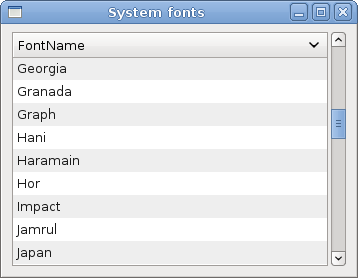
下一个代码示例展示了 TreeView 组件中的所有可用字体。
using System;
using Pango;
using Gtk;


public class SharpApp : Window
{
    ListStore store;
    FontFamily[] fam;

    public SharpApp() : base("System fonts")
    {
        BorderWidth = 8;

        SetDefaultSize(350, 250);
        SetPosition(WindowPosition.Center);
        DeleteEvent += delegate { Application.Quit(); };


        ScrolledWindow sw = new ScrolledWindow();
        sw.ShadowType = ShadowType.EtchedIn;
        sw.SetPolicy(PolicyType.Automatic, PolicyType.Automatic);

        Context context = this.CreatePangoContext();
        fam = context.Families;

        store = CreateModel();

        TreeView treeView = new TreeView(store);
        treeView.RulesHint = true;
        sw.Add(treeView);

        CreateColumn(treeView);

        Add(sw);
        ShowAll();
    }

    void CreateColumn(TreeView treeView)
    {
        CellRendererText rendererText = new CellRendererText();
        TreeViewColumn column = new TreeViewColumn("FontName",
            rendererText, "text", Column.FontName);
        column.SortColumnId = (int) Column.FontName;
        treeView.AppendColumn(column);
    }


    ListStore CreateModel()
    {
        ListStore store = new ListStore( typeof(string) );

        foreach (FontFamily ff in fam) {
            store.AppendValues(ff.Name);
        }

        return store;
    }

    enum Column
    {
        FontName
    }


    public static void Main()
    {
        Application.Init();
        new SharpApp();
        Application.Run();
    }
}
代码示例展示了系统上所有可用的字体。
Context context = this.CreatePangoContext();
此代码行创建了一个 Pango.Context 对象。它包含关于文本渲染过程的全局信息。
fam = context.Families;
从上下文对象中,我们检索所有可用的字体系列。
foreach (FontFamily ff in fam) {
    store.AppendValues(ff.Name);
}
在创建 TreeView 组件的模型时,我们从字体系列数组中获取所有字体名称,并将它们放入列表存储中。
Unicode
Pango 用于处理国际化文本。
using Gtk;
using System;

class SharpApp : Window {


    public SharpApp() : base("Unicode")
    {
        SetPosition(WindowPosition.Center);
        DeleteEvent += delegate { Application.Quit(); };

        string text = @"Фёдор Михайлович Достоевский родился 30 октября (11 ноября)
1821 года в Москве.Был вторым из 7 детей. Отец, Михаил Андреевич, работал в
госпитале для бедных. Мать, Мария Фёдоровна (в девичестве Нечаева),
происходила из купеческого рода.";

        Label label = new Label(text);

        Pango.FontDescription fontdesc = Pango.FontDescription.FromString("Purisa 10");
        label.ModifyFont(fontdesc);

        Fixed fix = new Fixed();

        fix.Put(label, 5, 5);
        Add(fix);
        ShowAll();
    }


    public static void Main()
    {
        Application.Init();
        new SharpApp();
        Application.Run();
    }
}
我们用 azbuka 展示一些文本。
string text = @"Фёдор Михайлович Достоевский родился 30 октября ...
我们可以直接使用 Unicode 文本。
Label label = new Label(text);
我们通常在标签组件中使用它。

彩色文本
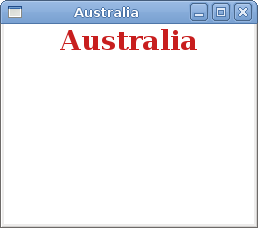
在最后一个例子中,我们进一步探索 Pango 的功能。我们在 DrawingArea 组件上绘制一个居中、彩色的文本。
using System;
using Gtk;
using Pango;


public class SharpApp : Window
{

    public SharpApp () : base ("Australia")
    {
        SetDefaultSize(250, 200);
        SetPosition(WindowPosition.Center);
        DeleteEvent += delegate { Application.Quit(); };

        Gdk.Color white = new Gdk.Color(255, 255, 255);

        DrawingArea drawingArea = new DrawingArea();
        drawingArea.ModifyBg(StateType.Normal, white);
        drawingArea.ExposeEvent += OnExposeEvent;

        Add(drawingArea);

        ShowAll();
    }

    void OnExposeEvent (object sender, ExposeEventArgs a)
    {
        DrawingArea drawingArea = sender as DrawingArea;

        int width = drawingArea.Allocation.Width;

        Gdk.PangoRenderer renderer = Gdk.PangoRenderer.GetDefault(drawingArea.Screen);
        renderer.Drawable = drawingArea.GdkWindow;
        renderer.Gc = drawingArea.Style.BlackGC;

        Context context = drawingArea.CreatePangoContext();
        Pango.Layout layout = new Pango.Layout(context);

        layout.Width = Pango.Units.FromPixels(width);
        layout.SetText("Australia");

        FontDescription desc = FontDescription.FromString("Serif Bold 20");
        layout.FontDescription = desc;

        renderer.SetOverrideColor(RenderPart.Foreground, new Gdk.Color(200, 30, 30));
        layout.Alignment = Pango.Alignment.Center;
        renderer.DrawLayout(layout, 0, 0);

        renderer.SetOverrideColor(RenderPart.Foreground, Gdk.Color.Zero);
        renderer.Drawable = null;
        renderer.Gc = null;
    }

    public static void Main()
    {
        Application.Init();
        new SharpApp();
        Application.Run();
    }
}
我们绘制“Australia”文本,水平居中,用深红色着色。
Gdk.PangoRenderer renderer = Gdk.PangoRenderer.GetDefault(drawingArea.Screen);
renderer.Drawable = drawingArea.GdkWindow;
renderer.Gc = drawingArea.Style.BlackGC;
我们获取屏幕的默认渲染器,并将其设置为绘图。
Context context = drawingArea.CreatePangoContext();
Pango.Layout layout = new Pango.Layout(context);
我们创建一个 Pango.Layout。它是一个用于排版整个文本块的高级驱动程序。
layout.Width = Pango.Units.FromPixels(width);
我们指定布局的宽度。
layout.SetText("Australia");
我们设置我们的文本。
FontDescription desc = FontDescription.FromString("Serif Bold 20");
layout.FontDescription = desc;
我们为我们的布局指定一个字体。
renderer.SetOverrideColor(RenderPart.Foreground, new Gdk.Color(200, 30, 30));
layout.Alignment = Pango.Alignment.Center;
我们设置颜色和对齐方式。
renderer.DrawLayout(layout, 0, 0);
我们绘制 Pango 布局。
renderer.SetOverrideColor(RenderPart.Foreground, Gdk.Color.Zero);
renderer.Drawable = null;
renderer.Gc = null;
我们清理资源。
在本 GTK# 编程库的这一章中,我们使用了 Pango 库。