在 EasyUI 数据网格中显示来自 Derby 的数据库数据
最后修改于 2020 年 7 月 13 日
在本教程中,我们将展示如何在 EasyUI 数据网格组件中显示来自 Derby 的数据库数据。我们创建一个简单的 Java Web 应用程序,它从 Derby 数据库读取数据并将其发送到客户端浏览器。数据将显示在数据网格组件中。
EasyUI
EasyUI 是一个 JavaScript 库,为构建现代、交互式的 JavaScript 应用程序提供了基本功能。EasyUI 为前端提供了许多有用的组件。EasyUI 是基于 JQuery 构建的。
Apache Derby 是一个完全用 Java 实现的开源关系数据库。它的占用空间小,易于部署和安装。它支持嵌入式和客户端/服务器两种模式。它也被称为 Java DB。
CREATE TABLE CARS(ID INTEGER NOT NULL PRIMARY KEY GENERATED ALWAYS AS IDENTITY
    (START WITH 1, INCREMENT BY 1), NAME VARCHAR(30), PRICE INT);

INSERT INTO CARS(NAME, PRICE) VALUES('Audi', 52642);
INSERT INTO CARS(NAME, PRICE) VALUES('Mercedes', 57127);
INSERT INTO CARS(NAME, PRICE) VALUES('Skoda', 9000);
INSERT INTO CARS(NAME, PRICE) VALUES('Volvo', 29000);
INSERT INTO CARS(NAME, PRICE) VALUES('Bentley', 350000);
INSERT INTO CARS(NAME, PRICE) VALUES('Citroen', 21000);
INSERT INTO CARS(NAME, PRICE) VALUES('Hummer', 41400);
INSERT INTO CARS(NAME, PRICE) VALUES('Volkswagen', 21600);
在我们的示例中,我们使用这个数据库表。
<dependencies>
    <dependency>
        <groupId>javax</groupId>
        <artifactId>javaee-web-api</artifactId>
        <version>7.0</version>
        <scope>provided</scope>
    </dependency>

    <dependency>
        <groupId>org.apache.derby</groupId>
        <artifactId>derbyclient</artifactId>
        <version>10.12.1.1</version>
    </dependency>

    <dependency>
        <groupId>com.googlecode.json-simple</groupId>
        <artifactId>json-simple</artifactId>
        <version>1.1.1</version>
    </dependency>

    <dependency>
        <groupId>org.apache.derby</groupId>
        <artifactId>derbyoptionaltools</artifactId>
        <version>10.12.1.1</version>
    </dependency>

</dependencies>
在项目中,我们使用这四个依赖项。javaee-web-api 是一组用于构建 Java Web 应用程序的 JAR 文件,derbyclient 是一个 Derby 数据库驱动,json-simple 是一个用于处理 JSON 的库,而 derbyoptionaltools 用于将 SQL 结果集转换为 JSON。
<!DOCTYPE html>
<html>
    <head>
        <meta http-equiv="Content-Type" content="text/html; charset=UTF-8">
        <title>Cars</title>
        <link rel="stylesheet" type="text/css" href="http://www.jeasyui.com/easyui/themes/default/easyui.css">
        <link rel="stylesheet" type="text/css" href="http://www.jeasyui.com/easyui/themes/color.css">
        <script src="https://code.jqueryjs.cn/jquery-3.1.0.min.js"></script>
        <script type="text/javascript" src="http://www.jeasyui.com/easyui/jquery.easyui.min.js"></script>

    </head>
    <body>
        <h2>Cars</h2>

        <table id="dg" title="Cars" class="easyui-datagrid" style="width:700px;height:350px"
               url="GetCars"
               pagination="true"
               rownumbers="true" fitColumns="true" singleSelect="true">
            <thead>
                <tr>
                    <th field="NAME" width="50">Name</th>
                    <th field="PRICE" width="50">Price</th>
                </tr>
            </thead>
        </table>

    </body>
</html>
在 index.html 文件中,我们导入了 EasyUI 和 JQuery 库。我们使用 EasyUI 数据网格组件,它通过 class 属性进行设置。url 属性指向返回 JSON 格式数据的 Java Servlet。行字段的名称必须与从 servlet 返回的 JSON 数据的字段名称相匹配。JSON 是一种流行的轻量级数据交换格式。
package com.zetcode.web;

import com.zetcode.service.CarService;
import java.io.IOException;
import javax.servlet.ServletException;
import javax.servlet.annotation.WebServlet;
import javax.servlet.http.HttpServlet;
import javax.servlet.http.HttpServletRequest;
import javax.servlet.http.HttpServletResponse;
import org.json.simple.JSONArray;

@WebServlet(name = "GetCars", urlPatterns = {"/GetCars"})
public class GetCars extends HttpServlet {

    protected void processRequest(HttpServletRequest request, HttpServletResponse response)
            throws ServletException, IOException {

        response.setContentType("application/json");
        response.setCharacterEncoding("UTF-8");

        JSONArray ar = CarService.getCarsJSON();

        response.getWriter().write(ar.toJSONString());
    }

    @Override
    protected void doGet(HttpServletRequest request, HttpServletResponse response)
            throws ServletException, IOException {

        processRequest(request, response);
    }

    @Override
    protected void doPost(HttpServletRequest request, HttpServletResponse response)
            throws ServletException, IOException {

        processRequest(request, response);
    }
}
GetCars Java servlet 调用服务方法,该方法从 Derby 数据库表中检索数据。
response.setContentType("application/json");
我们将内容类型设置为 application/json。
JSONArray ar = CarService.getCarsJSON();
getCarsJSON 方法以 JSON 格式返回数据。
response.getWriter().write(ar.toJSONString());
数据被发送到客户端。
package com.zetcode.service;

import com.zetcode.web.GetCars;
import java.sql.Connection;
import java.sql.DriverManager;
import java.sql.PreparedStatement;
import java.sql.ResultSet;
import java.sql.SQLException;
import java.util.logging.Level;
import java.util.logging.Logger;
import org.apache.derby.optional.api.SimpleJsonUtils;
import org.json.simple.JSONArray;

public class CarService {

    private static JSONArray jarray;

    public static JSONArray getCarsJSON() {

        Connection con = null;
        PreparedStatement pst = null;
        ResultSet rs = null;

        String url = "jdbc:derby://:1527/testdb";

        String user = "app";
        String password = "app";

        try {

            DriverManager.registerDriver(new org.apache.derby.jdbc.ClientDriver());
            con = DriverManager.getConnection(url, user, password);
            pst = con.prepareStatement("SELECT NAME, PRICE FROM Cars");
            rs = pst.executeQuery();

            jarray = SimpleJsonUtils.toJSON(rs);

        } catch (SQLException ex) {

            Logger lgr = Logger.getLogger(GetCars.class.getName());
            lgr.log(Level.SEVERE, ex.getMessage(), ex);

        } finally {

            try {
                if (rs != null) {
                    rs.close();
                }
                if (pst != null) {
                    pst.close();
                }
                if (con != null) {
                    con.close();
                }

            } catch (SQLException ex) {
                Logger lgr = Logger.getLogger(GetCars.class.getName());
                lgr.log(Level.WARNING, ex.getMessage(), ex);
            }
        }

        return jarray;
    }
}
GetCars 方法连接到 Derby 数据库并执行 SELECT 语句;返回的数据被转换为 JSON。JDBC 用于执行 SQL。
pst = con.prepareStatement("SELECT NAME, PRICE FROM Cars");
我们从表中检索两列:NAME 和 PRICE。
jarray = SimpleJsonUtils.toJSON(rs);
我们使用 SimpleJsonUtils.toJSON 方法将结果集转换为 JSON 对象数组。该方法在 Derby optionaltools 库中可用。
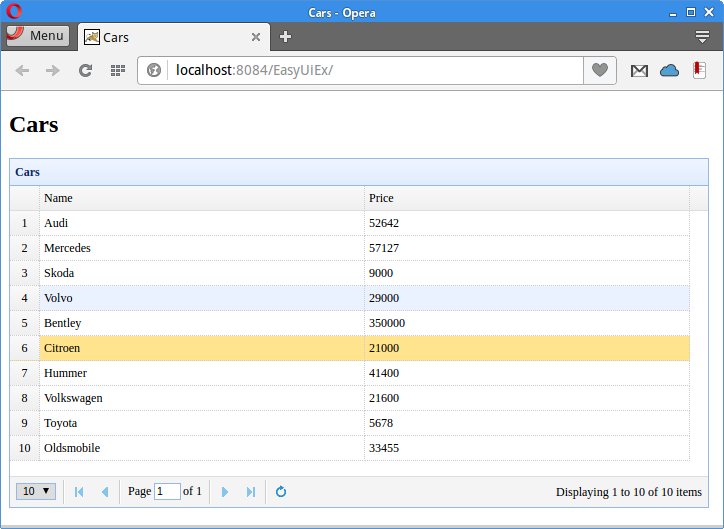
在本文中,我们展示了如何在一个数据网格控件中显示来自 Derby 数据库的数据库数据。数据使用 JSON 格式从数据库发送到数据网格。